AI tools for beginners can feel exciting, but they can also feel a little overwhelming at first. There are so many tools, features, and updates that it is easy to wonder where to begin.
The cozy way to start is simple: you do not need to try everything.
Instead, you can choose one or two easy AI tools that help with what you already do. Maybe you need help writing blog posts. Maybe you want Pinterest ideas. Maybe you want help planning content for the week.
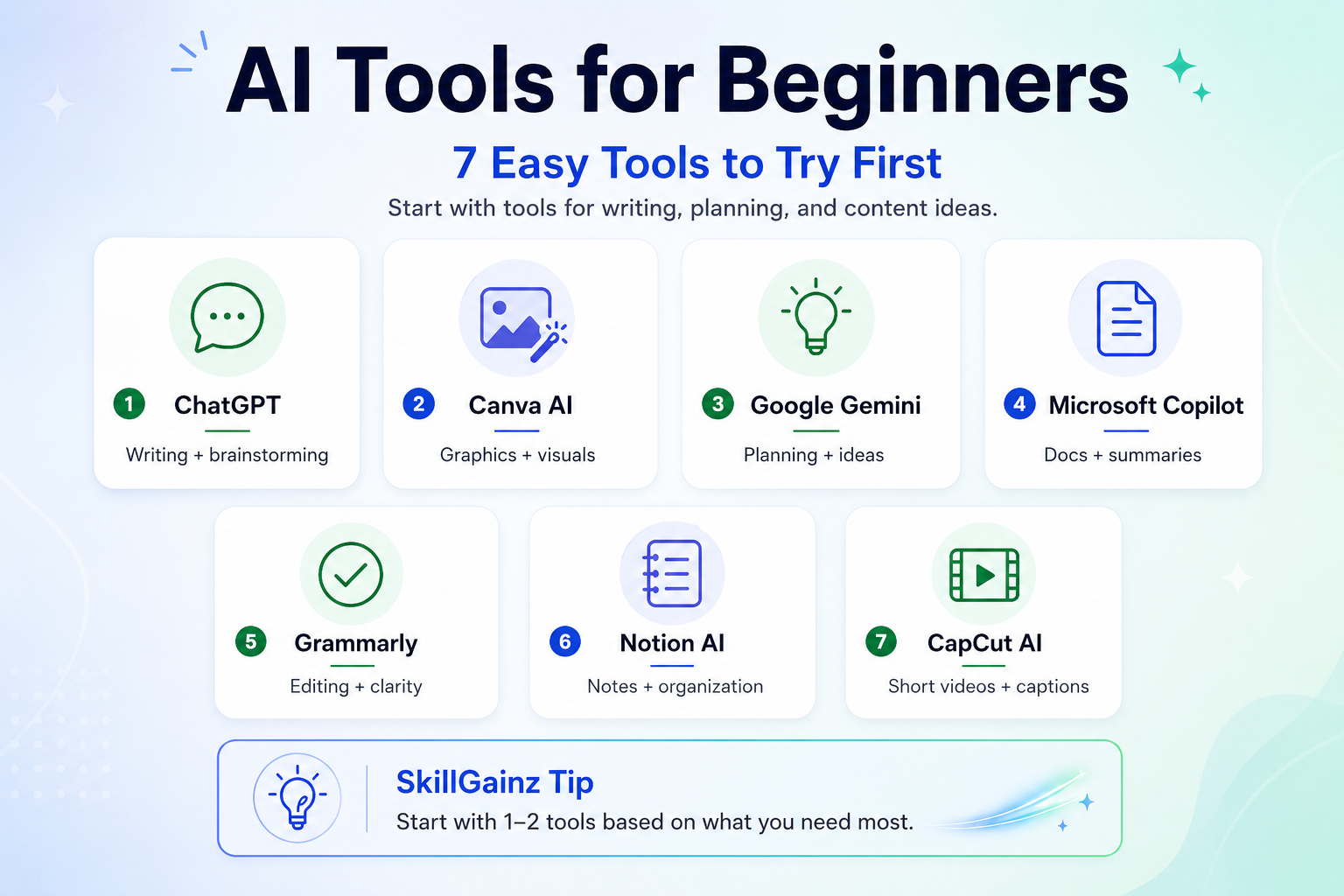
This guide shares 7 beginner-friendly AI tools you may want to try first. These are not tools you have to use all at once. Think of them as gentle options you can explore at your own pace.
Why Beginners Should Start with Simple AI Tools
When you are new to AI, the goal is not to become an expert overnight. The goal is to make small tasks easier.
AI can help you:
- Brainstorm ideas
- Write first drafts
- Improve your wording
- Plan your week
- Create social media captions
- Organize content ideas
- Make simple graphics or videos
For beginners, the best AI tools are usually the ones that feel easy to use and solve a real problem.
For example, OpenAI explains that ChatGPT can help with brainstorming, organizing ideas, and turning rough concepts into structured plans. It can also support writing tasks like drafting, revising, and adjusting tone.
So, instead of asking, “What is the most advanced AI tool?” a better question is:
“What do I need help with today?”
How to Choose AI Tools for Beginners
Before you sign up for every shiny new tool, it may help to choose based on your main task.
Choose based on your content need
Ask yourself:
- Do I need help writing?
- Do I need help planning?
- Do I need help creating graphics?
- Do I need help editing videos?
- Do I need help organizing ideas?
- Do I need help researching?
Once you know your main need, choosing a tool becomes much easier.
Start with one small task
A simple beginner workflow could look like this:
- Use ChatGPT to brainstorm blog post ideas.
- Use Canva to create a Pinterest pin.
- Use Grammarly to clean up the final writing.
That is enough for a beginner workflow. You do not need a complicated system right away.
1. ChatGPT: A Helpful AI Tool for Writing and Ideas
ChatGPT is one of the easiest AI tools for beginners because you can use it like a friendly helper. You type what you need, and it gives you ideas, drafts, outlines, or simple explanations.
You may use ChatGPT for:
- Blog post outlines
- YouTube video ideas
- Social media captions
- Email drafts
- Product descriptions
- Content calendars
- Simple explanations
ChatGPT can be especially helpful when you are staring at a blank page. OpenAI describes ChatGPT as useful for brainstorming, organizing thoughts, drafting, revising, and refining writing.
Beginner prompt to try
Give me 10 simple blog post ideas about AI tools for beginners.
SkillGainz Tip
Start with messy thoughts. You do not have to write a perfect prompt. You can always ask ChatGPT to make the answer shorter, warmer, clearer, or easier to understand.
2. Canva AI: A Simple Tool for Graphics and Visual Content
Canva is a good option for beginners who want to create graphics without learning complicated design software.
Canva AI can help with designs, visuals, text, and creative ideas. Canva says its AI tools can help users generate text, produce designs, and turn ideas into visual content inside Canva.
You may use Canva AI for:
- Pinterest pins
- Instagram posts
- Blog graphics
- Lead magnets
- Simple worksheets
- Presentations
- Social media templates
This makes Canva useful for bloggers, affiliate creators, small business owners, and digital product creators.
Beginner prompt to try
Create a Pinterest pin design idea for a blog post about AI tools for beginners.
SkillGainz Tip
Do not try to design from scratch every time. Start with a template, then adjust the colors, fonts, and wording to match your brand.
3. Google Gemini: A Gentle Option for Planning and Brainstorming
Google Gemini is another AI assistant that beginners may want to explore. Google describes Gemini as an AI assistant that can help with writing, planning, brainstorming, and more.
Gemini may be useful if you already use Google tools often or like to brainstorm in a simple chat format.
You may use Gemini for:
- Content planning
- Blog topic ideas
- Simple research support
- Weekly schedules
- Brainstorming angles
- Explaining topics in plain language
Google Workspace also describes Gemini as a tool that can help brainstorm, write, and edit content.
Beginner prompt to try
Help me plan 5 beginner-friendly blog posts about AI tools for content creators.
SkillGainz Tip
Use Gemini when you want to explore ideas from a different angle. Sometimes asking the same question in two tools can help you find a better direction.
4. Microsoft Copilot: A Helpful Tool for Documents and Work Tasks
Microsoft Copilot may be a good fit if you already use Microsoft Word, Excel, PowerPoint, Outlook, or OneDrive.
Microsoft shares that Copilot can help create content, summarize documents, and work with files in Microsoft 365 apps.
You may use Copilot for:
- Summarizing long documents
- Drafting content
- Creating presentation ideas
- Improving work notes
- Organizing information
- Writing emails
This tool may be especially useful for people who work with documents often.
Beginner prompt to try
Turn these rough notes into a clear beginner-friendly article outline.
SkillGainz Tip
Copilot is most useful if Microsoft tools are already part of your routine. If you do not use Microsoft apps often, you may not need to start here.
5. Grammarly: An Easy AI Tool for Better Writing
Grammarly is a helpful beginner tool because it focuses on improving writing. It can help with grammar, clarity, tone, and rewriting.
Grammarly describes its AI writing assistant as a tool that can help generate ideas and outlines for emails, reports, articles, and more. It also offers proofreading, clarity, flow, and tone suggestions.
You may use Grammarly for:
- Blog post editing
- Email polishing
- Social media captions
- Product descriptions
- Website copy
- Clearer sentences
This tool is helpful after you write your first draft.
Beginner prompt to try
Make this paragraph clearer and easier for beginners to understand.
SkillGainz Tip
Use Grammarly as your final polish tool. Let your own voice come first, then use AI to clean up the rough edges.
6. Notion AI: A Cozy Tool for Planning and Organizing
Notion is a workspace tool for notes, tasks, projects, and planning. Notion describes itself as an AI workspace where users can write notes, manage tasks, organize projects, and collaborate in one place.
Notion AI may be useful if your ideas are scattered in different places.
You may use Notion AI for:
- Content calendars
- Blog post planning
- To-do lists
- Idea banks
- Notes
- Project planning
- Simple workflows
For content creators, Notion can become a cozy “home base” for ideas.
Beginner prompt to try
Organize these content ideas into a simple 7-day content plan.
SkillGainz Tip
Start with one simple page. You do not need a complicated dashboard. A basic content idea list is enough in the beginning.
7. CapCut AI: An Easy Tool for Short Videos
CapCut is a popular option for short video editing. Its AI tools can help with video creation, editing, captions, templates, text-to-video, background removal, and other creator-friendly features.
This can be helpful if you create TikTok videos, Instagram Reels, YouTube Shorts, or Pinterest video pins.
You may use CapCut AI for:
- Auto captions
- Short-form video edits
- Text-to-speech
- Simple video templates
- Background removal
- Repurposing content
- Social media videos
Beginner prompt to try
Create a short video script about 3 easy AI tools for beginners.
SkillGainz Tip
Start with a 15–30 second video. Short and simple content is easier to finish than a big video project.
Simple Beginner AI Workflow to Try
Here is a calm workflow you may want to test:
Step 1: Brainstorm with ChatGPT or Gemini
Ask for blog post ideas, captions, or video topics.
Step 2: Plan in Notion
Save your ideas in one simple list or calendar.
Step 3: Write your first draft
Use ChatGPT, Gemini, or Copilot to help create an outline or rough draft.
Step 4: Edit with Grammarly
Clean up grammar, clarity, and tone.
Step 5: Create visuals with Canva
Make a Pinterest pin, blog image, or Instagram post.
Step 6: Make a short video with CapCut
Turn the same topic into a Reel, Short, TikTok, or Pinterest video.
This way, one idea can become many pieces of content.
Quick Safety Tips When Using AI Tools
AI tools are helpful, but they are not perfect. It is still important to review everything before publishing.
Before you post AI-assisted content, check:
- Is the information accurate?
- Does it sound like your voice?
- Is it helpful for your audience?
- Did you add your own experience?
- Are there any claims that need fact-checking?
- Does the content feel natural?
This matters because strong content should help real people, not just fill space.
Final Thoughts on AI Tools for Beginners
Starting with AI does not have to feel scary or complicated.
You can begin with one small task, one simple tool, and one clear goal. Maybe today you use ChatGPT for ideas. Tomorrow, you try Canva for a Pinterest pin. Later, you may use CapCut to make a short video.
There is no need to rush.
The best AI tools for beginners are the ones that help you create with less stress and more confidence. Start gently, keep your own voice, and let AI support your creative process instead of replacing it.
References and Sources
Here are the official tool pages and helpful resources referenced while creating this beginner-friendly guide:
- ChatGPT by OpenAI — AI chatbot for writing, brainstorming, learning, and everyday help.
- Canva AI — AI-powered design, writing, and creative tools for visual content.
- Google Gemini — Google’s AI assistant for writing, planning, brainstorming, and more.
- Google Workspace: AI Writing Tools with Gemini — Official Google resource about using Gemini for brainstorming, writing, and editing.
- Microsoft Copilot in OneDrive — Official Microsoft support page about using Copilot to summarize files.
- Grammarly AI Writing Assistant — AI writing help for ideas, outlines, grammar, clarity, and tone.
- Notion AI Workspace — AI workspace for notes, tasks, projects, and content organization.
- CapCut AI Video Editor — AI-powered video editing tools for short-form content and social media videos.